Void -> void wrapper
In Kotlin
Void non-null type
change the Unit or Void? (? operator)
nothing 이라는 타입이 있기에 표현식 가능
어래 링크에 식이라는 의미를 간결하게 설명하고 있음
Void -> void wrapper
In Kotlin
Void non-null type
change the Unit or Void? (? operator)
nothing 이라는 타입이 있기에 표현식 가능
어래 링크에 식이라는 의미를 간결하게 설명하고 있음

코루틴 보단 RX를 선호하는 편이지만 github를 보면 자주 보이는지라
정리해보고자 글을 씁니당
Android Q(10) 부터는 스토리 쓰기에 WRITE_STORAGE_PERMISSION 필요없다
개인공간(App 내부 파일) 별도의 읽기,쓰기 퍼미션이 필요 없다. 외부저장소 접근(READ)은
READ_EXTERNAL_STORAGE 퍼미션이 필요하다. Write(쓰기)에서 생성시
MediaStore를 통해서 파일을 생성할 수 있고, 특정 경로에만 저장 가능하다.
예를 들어 이미지 경로를 따로 정해서 저장할 수 있는 게 아니라
DCIM,Pictures 경로 설정을 해줘야 저장이 가능하다
아니면 allowed directories are DCIM, Pictures 에러가 발생한다.
경로 설정 과정에서 헛갈릴 수 있는 게 외부저장소는
Application External storage directories 아닌
External storage directories를 의미
이제 .. MediaStore나 SAF를 사용하여 외부저장소에서 파일을 해결해야 할 것 같다...
또한, 외부저장소 파일 수정,삭제하기 위해서는 별도의 Method가 존재
createWriteRequestcreateDeleteRequest참고
이제는 Android Scoped Storage를 준비해야 할 때 | by Wyatt | Medium
[Android] 내부 저장소 경로 (tistory.com)
안드로이드 - MediaStore에 미디어 파일 저장하는 방법 (codechacha.com)
connectTimeout(Duration duration) – Tcp socket을 타켓 host 연결 타임아웃 설정
readTimeout(Duration duration) – data 전송 타임아웃 설정
writeTimeout(Duration duration) – 서버에 send 시간 제한
OkHttpClient client = new OkHttpClient.Builder() .connectTimeout(5, TimeUnit.MILLISECONDS) .build();
0으로 하면 테스트할 때 강제 예외 발생시킬 줄 알았지만 그게 아니었다.
0은 타임아웃 없음을 의미 , 1 and {@link Integer#MAX_VALUE} 사이 값으로 해야 함
Retrofit 2 - Handle Connection Timeout Exception - HowToDoInJava
exoplayer 링크
Media Playback on Android with ExoPlayer: Getting Started | raywenderlich.com
처음 시작한다면 여기
왜? 해야하는지에 대한 설명이 좋다. 생략한 부분도 꽤 있지만 ..
전반적인 애기를 다루고 있다. 상세하게 하나하나 다 다루는건 아니지만
큰 맥락에서는 참고하면 좋은 사이트
기존 JAVA
public @Interface Temp{
String name();
}
그리고 Kotlin
annotation class Temp{
val name: String
@Temp(name = "MEME")
class Tempest{
}
Content URIs
<prefix>://<authority>/<data_type>/<id>
authority에는 contacts, browser 등등 ..
Query함수
-안드로이드에서 이미지나 오디오 정보를 알기 위해서 사용
Cursor query(Uri uri, String[] projection, String selection, String[] selectionArgs, String sortOrder)
uri - application에 접근가능한 주소
projection - 계획이란 의미를 가지고 있다. 얻고자 하는 Data정보를 넣어주자 좀 더 이야기를 한다면
MediaStore를 기반으로 Audio,Image,video ,Download로 세분화
selection - "${MediaStore.Audio.Media._ID} = ?" 같이 where 역할
selectionArgs - selection ?에 들어가는 value
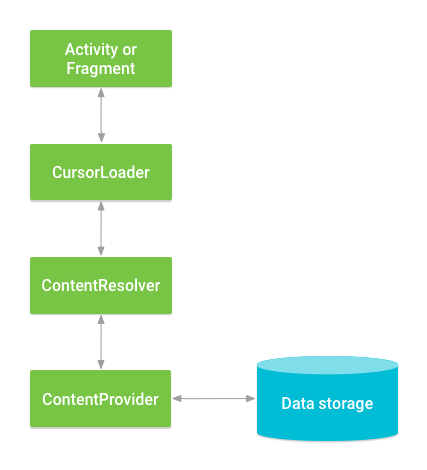
Figure 2. Interaction between ContentProvider, other classes, and storage.
DB에 직접적인 CRUD 하는 게 아니라면 (이미지나..,오디오 파일이나..)
ContentProvider로 class확장할 필요 없이
ContentResolver로 Query로..
Android - Content Providers - Tutorialspoint
android - How can I get only jpg or png images from cursor - Stack Overflow
잊지말자
Companion Object는
statice 클래스를 만들뿐 그안에 함수까지 static으로 두는 것은 아니다
그렇다면 Companion Objects 함수는 JVM에서 진짜 static은 아니다
그럼 어떻게 해야 할까
여러 방법이 있겠지만 @JvmStatic을 해당 함수에 붙여주자
아니라면 코틀린 파일(kt)을 따로 만들어서 fun을 적어주자 그러면 kotlin은 real static methods 간주한다
여기 사이트에는 2가지 방법이 나오는데 내게는 후자가 간단하다.
Defining Android Binding Adapter in Kotlin | by Herman Cheung | Medium
DataBinding을 하면서 xml에 사용해야 할 문구의 필요성을 느꼈다
+ - / * %+&& ||& | ^+ - ! ~>> >>> <<== > < >= <= (Note that < needs to be escaped as <)instanceof()null[]?:
RecyclerView는 3개의 컴포넌트로 이루어진다
LayoutManager
item Animator
Adapter
apapter는 itemViewType에 따라서 ViewHodler를 생성
Recycler pool에 요청했지만 없을 경우
CreateViewHolder에 따라서 생성한다
RecyclerView pool에서 ViewHolder가 존재하기 때문에 에를들어 프로그레스 UI를 9번째 item에서 나타게 하고 싶으면 아마도 .. ViewType에 position을 매개변수로 한 함수를 사용하면 될 것 같은 느낌이다..
순서
bindViewHolder -> onViewAttachedToWindow
(3) RecyclerView ins and outs - Google I/O 2016 - YouTube
Android Recycler View Lifecycle diagrams and notes (landenlabs.com)
Recycler View 제대로 이해하기 - RecyclerView lifecycle (tistory.com)
